

You train a custom AI model by defining your task, gathering the right data, choosing a base model, fine-tuning it, and testing it against real examples. That is the short version. The long version depends on your goal, your data, and your budget.
Off-the-shelf AI tools work fine for generic tasks. But they often fail at specialized jobs like sorting industry-specific documents, spotting defects in a niche product line, or writing in a very particular brand voice. That gap is why more teams now build their own models instead of relying only on general-purpose tools.
This guide walks you through the real process. It skips the hype and focuses on what actually happens between “I have an idea” and “my model works.”
What “Training a Custom AI Model” Actually Means
Training a custom model means adjusting an existing AI system, or building a new one, so it performs one specific task well. It is not the same as building AI from zero.
Most teams do not start from scratch. They start with a pre-trained model, like an open-source language model or a base image classifier, and adapt it. This process is called fine-tuning. It is faster, cheaper, and usually more accurate than starting fresh.
Fine-Tuning vs. Training from Scratch
Fine-tuning updates an existing model using your own data. Training from scratch builds a new model with no prior knowledge baked in.
Fine-tuning wins for almost every specialized business task. It needs less data, less compute power, and less time. Training from scratch only makes sense for research labs or companies with massive, unique datasets and serious infrastructure budgets.
Step 1: Define the Exact Task You Want the Model to Do
A vague goal leads to a weak model. Before touching any data, write down exactly what the model needs to output, given exactly what kind of input.
For example, “improve customer support” is too broad. “Classify incoming support tickets into five categories: billing, technical, shipping, refund, and other” is specific enough to build around.
A tightly defined task also makes it easier to measure success later. You will know if the model works because you can check it against a clear standard, not a vague feeling.
Common Specialized Use Cases
Specialized AI models tend to fall into a few recurring categories.
- Document classification for legal, medical, or financial records
- Visual defect detection in manufacturing
- Domain-specific chatbots trained on internal company knowledge
- Sentiment or intent detection in a specific industry’s language
- Code generation tuned to a company’s internal frameworks
Each of these needs different data types, but the underlying training process follows a similar path.
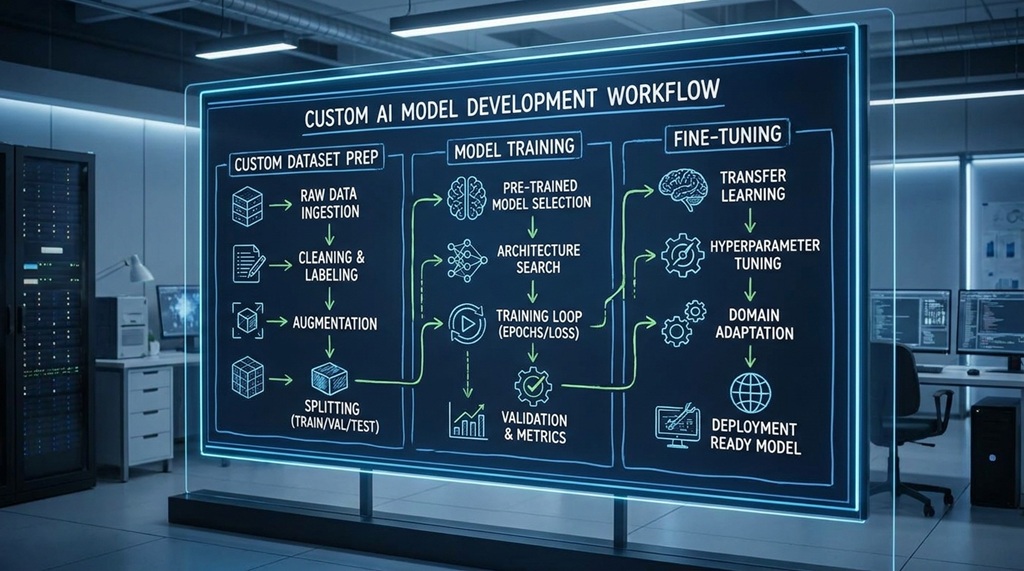
Step 2: Collect and Prepare High-Quality Data
Your model’s ultimate performance is defined strictly by the caliber of its training data; even state-of-the-art architectures fail when fed noisy, sparse, or biased datasets. To build a robust foundation, curate hundreds or thousands of high-fidelity, real-world examples that accurately represent the edge cases your system will encounter in production such as historical support tickets categorized by exact domain tags or meticulously annotated image sets. Before fine-tuning models on specialized domain data, mastering write engaging content with AI without losing your voice helps ensure that both your curated training prompts and resulting model outputs retain authentic human tone rather than generic, robotic phrasing.
Cleaning and Labeling Your Dataset
Raw data almost never comes ready to use. It needs cleaning first.
Remove duplicates, fix inconsistent labels, and strip out irrelevant noise like broken text or corrupted files. Then label the data clearly and consistently. Inconsistent labeling is one of the most common reasons custom models underperform, according to industry experts who work on machine learning pipelines.
How Much Data Do You Actually Need?
There is no single magic number, and anyone who gives you one exact figure without knowing your task is guessing. Simpler tasks with clear patterns can work with a few hundred examples. Complex tasks with many edge cases may need tens of thousands.
A practical approach: start with a smaller dataset, train a first version, and see where it fails. Then add more data targeted at those specific failure points instead of blindly collecting more of everything.
Step 3: Choose the Right Base Model and Training Approach
Picking the right starting point saves time and money. Most teams choose between open-source foundation models, commercial APIs with fine-tuning options, or fully custom architectures.
Open-source models like Llama, Mistral, or various vision transformers give you full control and no per-use fees, but you need infrastructure to run and fine-tune them. Commercial APIs from providers like OpenAI or Anthropic offer easier fine-tuning tools, but come with usage costs and less control over the underlying architecture.
Matching the Model Type to Your Task
Not every model fits every job. Language tasks need language models. Image tasks need vision models. Tasks that combine both, like reading a scanned form and extracting fields, need multimodal models.
Here is a genuinely useful shortcut most guides skip: test your task manually on a general-purpose model first, before you fine-tune anything. If a general model already gets it 70% right with a good prompt, you likely need light fine-tuning. If it gets it under 30% right no matter how you prompt it, you may need a different base model entirely, not just more training data.
Step 4: Fine-Tune the Model on Your Dataset
This is where the actual training happens. You feed your prepared dataset into the chosen model using a fine-tuning process, and the model adjusts its internal parameters to better match your examples.
Most fine-tuning today happens through managed platforms or libraries that handle the heavy technical lifting. You upload your dataset, set a few configuration options like training duration and learning rate, and the platform runs the training job.
Key Settings That Affect Results
A few settings matter more than people expect.
- Learning rate controls how much the model adjusts with each training step. Too high, and the model overcorrects and becomes unstable. Too low, and it barely learns anything.
- Epochs are full passes through your dataset. Too few, and the model underfits. Too many, and it memorizes your data instead of learning general patterns, a problem called overfitting.
- Validation split holds back a portion of your data to test the model honestly during training, instead of only checking it against data it already learned from.
You do not need to master the math behind these settings. Most platforms offer sensible defaults, and you can adjust from there based on results.
Step 5: Test, Evaluate, and Catch Failure Patterns
A model that looks good in training can still fail in the real world. Testing against fresh, unseen examples is the only way to know if it actually works.
Set aside a test set the model never saw during training. Run it through the model and compare the outputs to the correct answers. Look at overall accuracy, but also look closely at where it fails, not just how often.
Why Error Analysis Matters More Than Accuracy Scores
A model with 90% accuracy sounds strong, but the remaining 10% might all be the same type of mistake, and that pattern tells you exactly what to fix. This is the step most beginner guides gloss over.
Group your model’s mistakes into categories. Maybe it consistently confuses two similar categories, or struggles with short inputs, or fails on a specific edge case your original data barely covered. Fixing that one pattern often improves the model more than doubling your entire dataset size.
Step 6: Deploy and Monitor the Model in Production
A trained model is not a finished product until it works reliably in the real environment. Deployment moves the model from your testing setup into the system where people or software will actually use it.
Depending on your setup, this might mean hosting the model on a cloud server, embedding it in an app, or connecting it to an existing internal tool through an API. Test the full pipeline, not just the model in isolation, since real inputs often look messier than clean training data.
Ongoing Monitoring and Retraining
Models drift over time as real-world data shifts away from the patterns in your original training set. A support ticket classifier trained last year may struggle with new product lines or slang that did not exist during training.
Set up a simple process to review a sample of the model’s real outputs regularly. When you spot recurring mistakes, collect those examples and retrain. Treat your custom model as a living system that needs occasional updates, not a one-time project you finish and forget.
Frequently Asked Questions
How long does it take to train a custom AI model?
Timelines vary widely based on task complexity and data readiness. A simple text classification model with clean, labeled data can be fine-tuned in a few hours to a few days, while complex multimodal or large-scale models can take weeks, largely due to data preparation time rather than the training itself.
Do I need coding skills to train a custom AI model?
Not always. Many platforms now offer no-code or low-code fine-tuning interfaces where you upload data and adjust settings through a dashboard. However, coding skills give you more control over data preprocessing, custom evaluation, and deployment, which matters for complex or high-stakes tasks.
How much does it cost to train a custom AI model?
Costs range from nearly free, using open-source tools on your own hardware, to several thousand dollars for large-scale fine-tuning on commercial platforms. The biggest hidden cost is usually the time spent collecting and labeling quality data, not the compute itself.
Can I train a custom AI model with a small dataset?
Yes, for many tasks. Fine-tuning a pre-trained model needs far less data than training from scratch, and some tasks work well with just a few hundred well-labeled examples. Quality and consistency of the data matter more than raw quantity in most specialized use cases.
What is the biggest mistake people make when training a custom AI model?
The most common mistake is starting with messy, inconsistent, or unrepresentative data instead of fixing that foundation first. A powerful model trained on poor data will still produce poor results, no matter how advanced the underlying architecture is.
Conclusion
Training a custom AI model for a specialized task comes down to six steps: define the task clearly, gather quality data, pick the right base model, fine-tune it, test it honestly, and monitor it after launch. None of these steps require you to build AI from the ground up. Most successful custom models start with an existing foundation model and get shaped through fine-tuning and careful data work.
The teams that succeed are not the ones with the fanciest infrastructure. They are the ones who define their task clearly, respect the importance of clean data, and keep testing and refining after launch instead of treating training as a one-time event.

Leave a Reply