

Choosing the right smart speaker comes down to three things: your existing smart home devices, your preferred voice assistant, and how you plan to use the speaker daily. Get these three factors right, and everything else falls into place. Get them wrong, and you’ll end up with a speaker that fights your other devices instead of working with them.
This guide walks you through exactly what to check before you buy. You’ll learn how to match a speaker to your ecosystem, compare sound quality across price points, and avoid the privacy pitfalls many buyers overlook.
By the end, you’ll know exactly which smart speaker fits your home, your budget, and your habits.
Match the Speaker to Your Smart Home Ecosystem First
Your smart speaker choice should follow your existing devices, not the other way around. If you already own smart bulbs, plugs, or a video doorbell, check which voice assistant they support before you buy anything.
Most smart home devices work with one or more of three major assistants: Amazon Alexa, Google Assistant, or Apple’s Siri. Buying a speaker outside that ecosystem often creates extra steps, or worse, devices that simply won’t connect.
How to Check Compatibility Before You Buy
Look at the product page or box of your existing smart devices. It usually lists supported platforms directly. If you see “Works with Alexa” or “Works with Google Home,” that’s your answer.
For newer devices, also check for Matter support. Matter is a smart home standard designed to let devices from different brands work together, regardless of which assistant you use. According to industry experts, Matter adoption is growing steadily, which means future-proofing your setup matters more than it did a few years ago.
Compare Sound Quality Across Different Price Points
Sound quality varies dramatically between budget and premium smart speakers, and price is usually a reliable indicator. Entry-level speakers under $50 handle voice commands well but sound thin during music playback.
Mid-range speakers, typically $80 to $150, add better bass response and clearer highs. These work well for kitchens, bedrooms, and small living rooms where audio quality matters but isn’t the top priority.
Premium smart speakers above $150 compete with dedicated Bluetooth speakers on audio quality. Brands like Sonos and Apple push into this category hard, and the difference is noticeable, especially with music that has deep bass or layered vocals.
Should You Prioritize Sound Over Smart Features?
That depends on how you’ll use the speaker most. If you mainly want hands-free control for lights, timers, and quick questions, a budget model works fine. If music listening is your main use case, spend more on audio quality, since the smart features across most price tiers perform similarly.
Decide Between a Single Speaker and a Multi-Room System
A single smart speaker suits one room, but a multi-room system changes how you experience music throughout your home. Multi-room setups let you play the same song in every room simultaneously, or different songs in different rooms.
Most major brands support this feature natively. Amazon’s Echo lineup, Google’s Nest speakers, and Sonos all offer multi-room grouping through their respective apps. You don’t need matching models in every room, though pairing similar speakers usually delivers more consistent sound.
Consider your home layout before committing to multiple units. Open floor plans often need fewer speakers to fill the space, while homes with distinct rooms benefit from one speaker per zone.
Understand the Privacy and Data Trade-Offs
Smart speakers listen for wake words continuously, which raises legitimate privacy questions. Understanding what each brand does with your data helps you make an informed choice, not just a convenient one.
All major smart speakers process voice commands through cloud servers by default. This means your requests travel to company servers for interpretation before the speaker responds. Some brands, including Amazon and Google, allow you to review and delete voice recordings through their respective apps.
Practical Steps to Protect Your Privacy
You can reduce data collection without giving up functionality. Most speakers include a physical mute button that disables the microphone entirely.
Check your assistant’s app settings regularly. Voice history deletion options exist in Alexa’s app under Privacy Settings, and in Google Home under Assistant settings. Review these every few months, since default settings change periodically as companies update their privacy policies.
Longevity and Ecosystem Compatibility
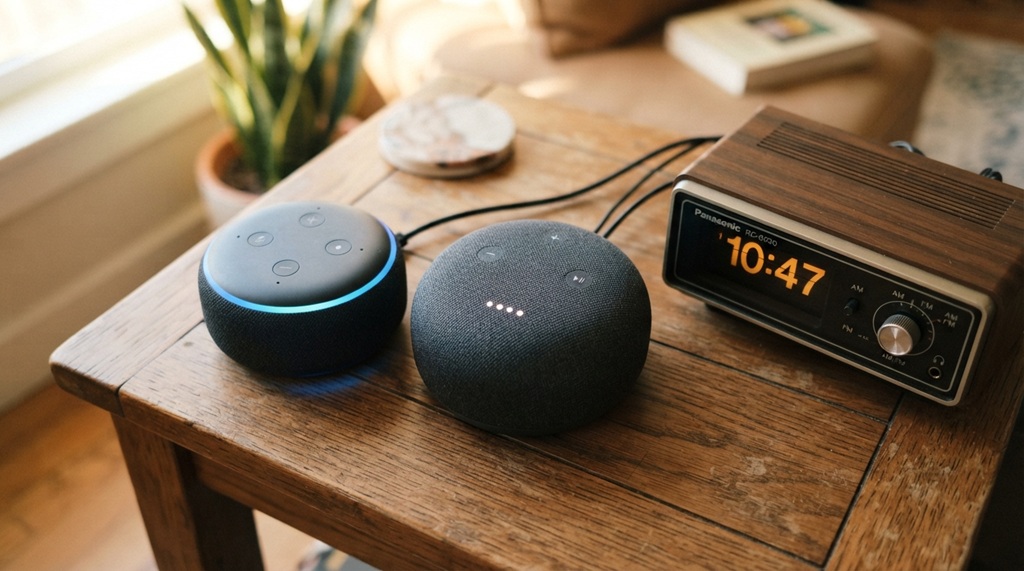
When investing in a smart speaker, selecting a model with robust manufacturer support and a broad integration ecosystem ensures your setup remains functional and scalable as your home automation evolves. Smart home technology advances rapidly, making software longevity a critical factor; legacy hardware frequently loses access to newly introduced capabilities, leading to feature degradation over time. Before purchasing, verify the manufacturer’s guaranteed update timeline for your specific device to safeguard against early obsolescence. Additionally, consider the platform’s third-party integration landscape: Amazon Alexa currently offers the most expansive third-party skill ecosystem, closely followed by Google Assistant, while Apple’s Siri continues to narrow the gap. If you intend to bridge modern voice automation with legacy equipment, exploring set up retro tech gear and vintage audio players provides a seamless framework for connecting classic turntables and analog receivers directly into your multi-room audio network.
Consider Your Room Size and Placement Needs
Speaker placement affects performance more than most buyers realize, and room size should influence your speaker choice directly. A single powerful speaker often outperforms a smaller model pushed to its limits in a large open room.
For rooms under 200 square feet, most standard smart speakers provide adequate volume and clarity. Larger rooms, especially those with high ceilings or open-concept layouts, benefit from either a larger speaker or a multi-speaker setup, as discussed earlier.
Placement matters too. Corners tend to boost bass artificially, which can distort sound. Central placement, away from walls when possible, usually produces the most balanced audio.
Frequently Asked Questions
Which smart speaker brand is best for beginners?
Amazon’s Echo Dot and Google’s Nest Mini both work well for beginners due to their simple setup process and affordable price. Both connect easily through their companion apps, and both support a wide range of basic smart home functions right out of the box.
Can I use multiple smart speaker brands in the same home?
Yes, but it creates extra complexity, since each brand typically requires its own app for full control. Matter-compatible devices reduce this friction somewhat, allowing shared control across ecosystems for supported features, though full functionality often still requires the original app.
Do smart speakers work without an internet connection?
Most core features require an internet connection to process voice commands and cloud services. Some devices offer limited offline functionality, like local timers or basic music playback from paired devices, but smart home control and voice recognition typically stop working without connectivity.
How much should I expect to spend on a good smart speaker?
Budget models start around $25 to $50 and handle basic tasks well. For better sound quality and additional features, expect to spend $80 to $150, while premium options with audiophile-level sound often exceed $200.
Are smart speakers safe for homes with children?
Most smart speakers include parental controls, such as content filters and purchase restrictions, accessible through the companion app. According to industry experts, reviewing these settings before children use the device regularly helps prevent unwanted purchases and inappropriate content.
Conclusion
Choosing the right smart speaker starts with your existing ecosystem, not the flashiest new release. Match the assistant to your current devices, decide how much sound quality matters to you, and think about whether you need one speaker or several.
Privacy settings and long-term software support deserve equal attention, since these factors affect your experience for years, not just on day one. Take these steps into account, and you’ll land on a speaker that genuinely fits your smart home instead of complicating it.

Leave a Reply