

Most AI answers disappoint for one reason: the prompt behind them is vague. You get better, faster results by giving AI clear context, a defined role, and a specific format to follow. This isn’t a gift some people have. It’s a skill you can learn in a single afternoon.
This guide breaks down exactly how skilled users talk to AI tools like ChatGPT, Claude, and Gemini. You’ll see the small changes that turn a flat, generic reply into something you can actually use. No jargon. No fluff. Just techniques you can apply on your very next prompt.
We’ll cover structure, common mistakes, and a few advanced tricks that most beginners skip. By the end, you’ll have a repeatable system for getting sharp results every time.
Why Most People Get Weak AI Results
Weak results almost always come from weak input. AI tools respond to what you give them. A one-line question forces the model to guess your intent, your audience, and your format. That guesswork is where quality breaks down.
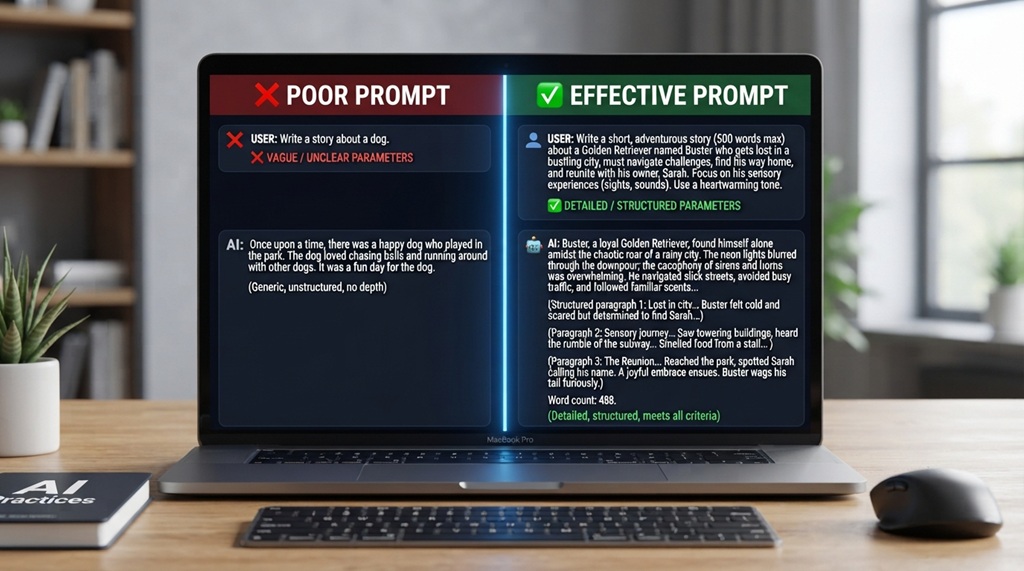
Think about the difference between these two prompts:
- “Write about marketing.”
- “Write a 300-word LinkedIn post for small business owners about low-cost marketing tactics. Use a friendly tone and end with a question.”
The second prompt removes the guesswork. It tells the AI who the audience is, what format to use, and how long the output should be. The model can now focus on quality instead of trying to fill in blanks.
Most people also skip a step: reviewing the first answer and refining it. AI conversations work best as a back-and-forth, not a single request. Treat your first prompt as a draft instruction, not a final one.
The Core Elements of a Strong AI Prompt
A strong prompt usually contains four parts: role, context, task, and format. Missing any one of these often leads to a generic or off-target answer.
Give the AI a Role
Assigning a role focuses the AI’s tone and knowledge base. Instead of asking a general question, tell the AI who it should act as.
Example: “Act as a certified nutritionist” produces a very different answer than “Act as a fitness influencer,” even for the same question about protein intake.
Add Real Context
Context tells the AI what it’s working with. Without it, the model fills gaps with generic assumptions that may not fit your situation.
Useful context includes your industry, your audience, your goal, and any constraints. For example, “I run a small bakery in a college town” gives the AI far more to work with than “I have a small business.”
State the Task Clearly
The task is the actual instruction. Be specific about what you want the AI to produce, not just the topic you want covered.
Instead of “help me with my resume,” try “rewrite my resume summary to highlight leadership experience for a project manager role.” The second version tells the AI exactly what success looks like.
Specify the Format
Format tells the AI how to shape the output. This includes length, structure, and style.
Ask for bullet points, a table, a short paragraph, or a numbered list, depending on what you need. Formatting requests are often the fastest way to improve usefulness without changing the actual content.
Advanced AI Prompting Techniques Beyond the Basics
While foundational formulas like role-context-task-format get you started, mastering elite AI output requires leveraging underutilized techniques like multi-step chain-of-thought logic, few-shot conditioning, and iterative refinement constraints. These sophisticated strategies bridge the gap between generic responses and precise, publication-ready solutions, giving you full control over tone, analytical depth, and execution. If you are ready to take your productivity even further after refining your prompt engineering, learn to use AI workflow tools to automate your daily tasks to seamlessly integrate these advanced prompts into an automated daily workflow.
Ask the AI to Ask You Questions First
Instead of writing a perfect prompt upfront, try this: “Before you answer, ask me any clarifying questions you need.” This flips the interaction. The AI identifies missing information and asks for it directly, which often reveals gaps you didn’t think to fill.
This technique works especially well for complex tasks like business plans, technical documentation, or long-form content, where small missing details change the whole output.
Use Constraints to Sharpen Output
Constraints force the AI to make choices instead of hedging. Try adding limits like “in exactly 3 bullet points” or “using only words a 10-year-old would understand.”
Constraints also work well for creative tasks. Asking for “a tagline in under 8 words” pushes the AI toward sharper, more original phrasing than an open-ended request.
Request Multiple Versions
Asking for three different versions of an answer, rather than one, gives you options and often surfaces an angle you hadn’t considered. This is especially useful for headlines, subject lines, or short copy where tone matters.
Chain Prompts for Complex Tasks
Break large tasks into smaller steps instead of asking for everything at once. First ask the AI to outline a plan, then ask it to draft one section at a time. This chained approach produces more focused, coherent results than a single massive request, particularly for long articles or detailed reports.
Common Prompting Mistakes That Waste Time
Even experienced users fall into a few repeatable traps. Fixing these usually improves results immediately.
Being Too Vague
Vague prompts like “make this better” leave the AI guessing what “better” means. Always specify what dimension you want improved: clarity, tone, length, or persuasiveness.
Overloading a Single Prompt
Cramming five different requests into one prompt often causes the AI to address some points well and others poorly. Split complex requests into separate, sequential prompts for stronger results on each part.
Skipping the Follow-Up
Many users accept the first answer, even when it’s only half right. Treat your first response as a starting point. Ask the AI to revise specific parts rather than starting over from scratch.
Ignoring Word Choice
Small word changes shift the AI’s output significantly. Terms like “summarize,” “explain,” and “analyze” all produce different structures, even for the same input text. Choose the verb that matches what you actually want.
How to Test and Refine Your Prompts
Testing turns guesswork into a system. Treat prompting like a skill you sharpen through repetition, not a one-time task.
Start by saving prompts that worked well for you. Keep a simple document with prompt templates for tasks you repeat often, like writing emails, summarizing articles, or brainstorming ideas. This saves time and builds consistency across your work.
Next, compare outputs when you change one variable at a time. Adjust only the tone, or only the length, and note how the result shifts. This helps you learn which specific words and structures drive the changes you want.
Finally, ask the AI to critique its own output. A prompt like “review your last answer and point out any weak spots” often produces a useful self-assessment you can act on immediately.
Industry-Specific Prompting Tips
Different fields benefit from different prompting approaches, based on what the work actually requires.
For content creators: Specify audience reading level and desired emotional tone. According to industry experts, adding a target reading level noticeably improves how usable AI-generated drafts are for publication.
For developers: Include the programming language, the framework version, and any error messages in full. Vague bug reports produce vague fixes, while precise details produce precise code.
For marketers: Provide brand voice guidelines and a specific call-to-action goal. This keeps generated copy aligned with existing campaigns instead of sounding generic.
For students and researchers: Ask the AI to cite reasoning steps or show its work, particularly for math or logic-based tasks. This makes errors easier to catch before you rely on the answer.
Frequently Asked Questions
What is the best way to start a prompt for AI tools?
Start by stating the role you want the AI to take, followed by the specific task and any format requirements. This gives the model clear direction from the very first line, reducing the need for follow-up corrections.
How long should a good AI prompt be?
There’s no fixed length, but detail matters more than word count. A two-sentence prompt with clear context often outperforms a rambling paragraph that lacks specifics.
Can I improve a bad AI response without starting over?
Yes. Ask the AI to revise specific parts of its answer, such as tone, length, or a particular section, rather than submitting a brand-new prompt. This preserves the parts that already worked.
Do different AI tools need different prompting styles?
The core principles, like providing role, context, and format, work across most AI tools. Some platforms respond better to very explicit step-by-step instructions, so it helps to test the same prompt style across tools you use regularly.
Is prompt engineering a skill worth learning in 2026?
Yes, especially as AI tools become embedded in everyday work. Strong prompting skills consistently save time and improve output quality, making the learning investment worthwhile for most professionals.
Conclusion
Prompting AI well comes down to a simple habit: give the model role, context, task, and format every time you ask for something. Add constraints, request revisions, and test what works for your specific needs. Small changes to how you ask often produce large changes in what you get back.
Start applying one technique from this guide on your next AI conversation. Once it becomes routine, you’ll notice faster, sharper results without any extra effort.

Leave a Reply