
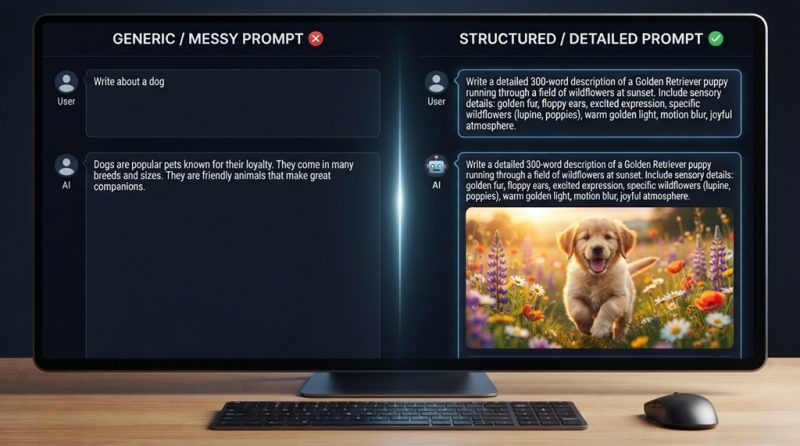
If you want better AI prompts, give the model three things every time: clear context, a specific task, and the exact format you expect back. Vague requests get vague answers AI tools like ChatGPT, Claude, and Gemini can only work with what you give them. The good news is that prompt writing is a learnable skill, not a talent some people are born with.
Most people treat AI chatbots like a search engine, typing a few keywords and hoping for magic. That’s why so many users end up frustrated, retyping the same request five different ways. The real fix isn’t a “secret prompt” or a paid template pack it’s understanding a handful of principles that consistently produce sharper, more usable output.
This guide breaks down exactly how to structure a prompt, the mistakes that quietly wreck your results, and a few advanced techniques that most beginner guides skip entirely.
What Makes a Prompt “Good” in the First Place

A good prompt is one that removes guesswork for the AI model. It tells the system who it should act as, what the output needs to accomplish, and how that output should look so the model isn’t filling in gaps with generic assumptions.
Think of it from the model’s side. When you type “write a blog intro about coffee,” the AI has to guess your tone, audience, length, and angle. It will pick the statistical average of every coffee blog intro it’s ever seen which is exactly why so much AI output feels bland and interchangeable. A strong prompt closes those gaps before the model starts generating.
The strongest prompts generally include four elements:
- Role or persona — who should the AI “be” while answering (a copywriter, a data analyst, a blunt editor)
- Task — the specific action you want performed
- Context — background info the model needs to tailor the response
- Format — how you want the answer structured (bullet points, table, word count, tone)
You don’t need all four in every single prompt, but leaving out context and format is the single biggest reason AI answers feel “off.”
Mastering Role-Based Prompting for High-Precision Outputs
By establishing a explicit persona before issuing a directive, you immediately ground the AI’s internal reasoning, narrowing its behavioral domain and eliminating generic, broad-brush responses. Rather than querying the system in isolation, framing your prompt through an expert perspective—defining both the specific role and the exact target goal—forces the model to adopt the nuance, vocabulary, and analytical depth of an industry specialist. Once you master this foundational prompt engineering technique, you can elevate your efficiency further by delegating entire multi-step workflows to intelligent software; use AI tools to automate daily tasks fast to save hours every single week.
Compare these two prompts:
- Weak: “Give me tips for my resume.”
- Strong: “Act as a senior tech recruiter reviewing resumes for mid-level software engineering roles. Review the resume below and give me 5 specific improvements, ranked by impact.”
The second version tells the AI whose lens to look through, what industry context matters, and how many suggestions to return. Recruiters, teachers, developers, and marketers all evaluate the same content differently giving the model a role tells it which lens to apply.
Pair the Role With a Concrete Goal
A role without a goal still leaves too much open. Add what success looks like: are you trying to persuade, summarize, simplify, or generate ideas? “Act as a nutritionist and explain intermittent fasting” is better than no role at all, but “Act as a nutritionist and explain intermittent fasting to a complete beginner in under 150 words, avoiding medical jargon” removes almost all ambiguity.
Give the AI Real Context, Not Just a Task
Context is the background information the model needs to tailor its answer to your specific situation rather than giving a generic textbook response. Without it, you’ll often get a technically correct answer that’s practically useless for your actual situation.
For example, “Write a marketing email for my product launch” could produce anything from a casual DTC brand voice to a stiff corporate announcement. Adding context changes everything:
“Write a marketing email announcing the launch of a $40 reusable water bottle aimed at office workers who care about sustainability. The brand voice is friendly and a little witty, not corporate. The email should be under 150 words and end with a single clear call-to-action to shop the new collection.”
Notice how much of the guesswork disappears. The price point, audience, tone, length, and desired action are all spelled out nothing is left for the model to invent.
The Context Most People Forget: What NOT to Include
One angle that rarely gets mentioned in prompt-writing guides is negative constraints explicitly telling the AI what to avoid. Models are trained on enormous amounts of generic content, so they default to clichés, hedging language, and overly formal phrasing unless told otherwise. Adding a line like “avoid buzzwords like ‘game-changer’ and don’t use exclamation points” often improves output quality more than adding another sentence of positive instruction, because it directly counters the model’s default habits rather than just adding more open-ended direction.
Specify the Output Format You Actually Want
Telling the AI exactly how to structure its answer length, format, and style is one of the fastest ways to get output you can use immediately instead of editing for ten minutes. Most people skip this step and then manually reformat the AI’s response afterward, which defeats the purpose of using AI to save time.
Useful format instructions include:
- Word or character count (“under 100 words,” “exactly 3 bullet points”)
- Structure (“respond in a table with columns for Pros and Cons”)
- Reading level (“explain like I’m a complete beginner”)
- Tone (“professional but conversational, no jargon”)
If you’re generating something you’ll paste directly into an email, document, or spreadsheet, say so. “Format this as a table I can paste into Google Sheets” gets a very different, more usable response than a plain paragraph answer.
Use Examples to Show, Not Just Tell (Few-Shot Prompting)

Giving the AI one or two examples of the output you want is one of the most reliable ways to lock in a specific style, and it consistently outperforms trying to describe that style in words alone. This technique is often called “few-shot prompting,” and it works because showing a pattern is more precise than describing one.
Say you want product descriptions written in a specific voice. Instead of writing three paragraphs trying to describe that voice, just show one example:
“Here’s an example of our brand voice: ‘This blanket won’t just keep you warm it’ll make you cancel your Friday night plans.’ Now write a similar description for our new ceramic mug.”
The AI now has a concrete pattern to match rather than an abstract description to interpret, which is why examples tend to produce more consistent results than adjectives like “witty” or “punchy” on their own.
Break Complex Requests Into Steps
For anything with multiple moving parts, walk the AI through the process in stages instead of asking for the finished product in one shot. Complex one-shot prompts tend to produce shallow output because the model is trying to satisfy too many requirements simultaneously.
If you’re planning a content calendar, for instance, don’t ask for “a month of social media posts” in one prompt. Instead:
- Ask the AI to brainstorm 10 content themes relevant to your niche
- Have it pick the 4 strongest themes and explain why
- Ask it to draft one post per theme in your preferred format
This step-by-step approach, sometimes called prompt chaining, generally produces more thoughtful, tailored results because the model isn’t trying to plan, write, and format everything at once. It also gives you checkpoints to redirect the AI before it goes too far down the wrong path.
Common Prompt Mistakes That Quietly Ruin Your Results
Most disappointing AI outputs come down to a small number of repeated mistakes rather than the AI simply being “bad” at the task. Fixing these usually improves results faster than learning any advanced technique.
Being Too Vague
Prompts like “write something about marketing” give the AI almost nothing to work with, so it defaults to the most generic, average version of that topic it can produce. Always narrow the scope: what aspect of marketing, for what audience, in what format.
Overloading a Single Prompt
Cramming five separate requests into one prompt tone, structure, examples, word count, and a call-to-action all at once often causes the AI to prioritize some instructions over others. If your prompt is a full paragraph of stacked demands, consider splitting it into a sequence of shorter prompts instead.
Not Reviewing and Refining
Treating the first AI response as final, rather than treating the exchange as a conversation you can redirect, is a major reason people give up on AI tools too early. If the tone is off or the structure isn’t right, say so directly: “make this more casual” or “cut this by half” almost always produces a better second draft than starting over.
Forgetting to Set Boundaries on Length or Scope
Leaving out a length requirement is one of the most common reasons people end up manually trimming or padding AI output afterward. A single line “keep this under 200 words” saves that entire editing step.
FAQ: Writing Better AI Prompts
Does the order of information in a prompt matter?
Yes, generally putting the most important instructions (role, core task, and critical constraints) early in the prompt tends to get more consistent adherence than burying them at the end. If you have one non-negotiable requirement, state it clearly rather than tacking it on as an afterthought.
How long should a good AI prompt be?
There’s no fixed word count a short prompt is fine for simple tasks, while complex requests genuinely need more detail to avoid ambiguity. The right length is whatever it takes to remove guesswork, not a specific number of words.
Can I reuse the same prompt across different AI tools like ChatGPT, Claude, and Gemini?
Mostly yes, since the core principles of role, context, and format apply across tools, but expect to tweak wording since each model interprets instructions slightly differently. It’s worth testing a prompt on your specific tool rather than assuming identical results everywhere.
Why does the AI keep ignoring part of my prompt?
This usually happens when a prompt has too many competing instructions packed into one request, causing the model to prioritize some over others. Splitting the request into smaller, sequential prompts almost always fixes this.
Is it worth using prompt templates I find online?
Templates can be a useful starting point, but the biggest improvements come from customizing them with your specific context, audience, and goals rather than copying them exactly. A generic template with your specific details added will almost always outperform a generic template used as-is.
Final Thoughts
Writing better AI prompts isn’t about memorizing a magic phrase it’s about consistently giving the model a clear role, real context, a specific task, and the exact format you want back. Combine that with examples when style matters and step-by-step breakdowns for complex requests, and most of the frustration people associate with AI tools disappears.
The habit that matters most, though, is treating your first prompt as a draft rather than a final attempt. Refining and redirecting the AI’s response almost always gets you to a better result faster than starting over from scratch and that back-and-forth is exactly how prompting skill gets built over time.

Leave a Reply